 |
Robotics
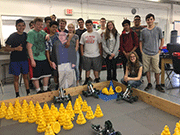
Students will design, build and program robots that will perform in a number of events. |
|
|
Purpose |
|
| 1. Robot Assembly |
Students will assemble a V5 Clawbot Robot as they follow a step-by-step guide. |
Step-by-Step Guide |
| 2. Install Vex Coding Studio |
Students will download "VEXcode V5 Blocks" which is the application they will use to program their robots. |
Click Here. |
| 3. Program The Robot to Move Thru
"The Maze!" |
Students will begin the process of learning how to program their robots so that they successfully complete the "The Maze" using "VEXcode V5 Blocks." |
Click Here |
| 4. Programming The Sensor & Solve: "The Sensor Puzzle?" |
Students will learn how to code their robot so that it will respond to a variety of sensors: 1. Bumper, 2. Limit Switch, 3. Ultrasonic Range Finder, 4. Vision Sensor, 5. Line Sensor and finally, the Sensor Puzzle. |
Click Here. |
| 5. Pairing Controller & V5 Robot Brain (& Reset!) |
Students will create a connection between their micro controller and their robot. |
Pairing Guide
Reset Controller Reset Brain |
| 6. Programming the Controller |
Students will learn how to program their Controller so that they can control the movement of their robots. |
Click Here. |
| 7. Competition: "Rocket League!" |
Students will reengineer their robots to compete in "Rocket League . This is the final robotics competition of the year - the goal is purely to have fun! |
Click Here. |
| Dismantle Robots |
Students will dismantle and repack their robots so next year's students are ready to receive them. |
Click Here. |