Programming If/Then & Forever/Repeat Statements
If/Then Statements allow you to write a program that reacts to something occurring.
Now that you have learned how to code Motion for your Vex robot, lets add an If/Then Statement to your program.
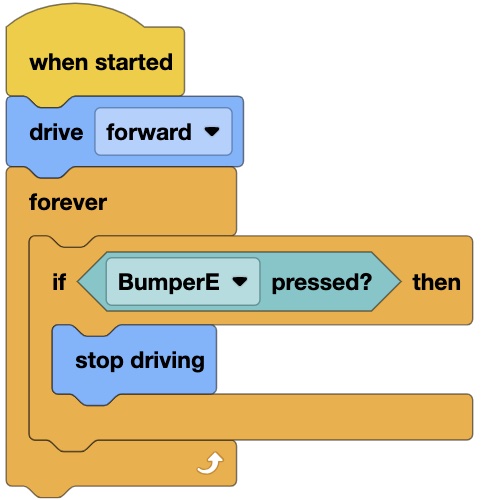
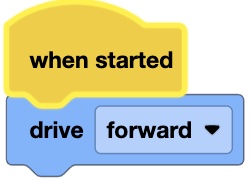
Step #1: Write a program for your robot that has it move forward with no time limit. Download it to your robot and test it.
Create a new project. Add a new device: Device / Drivetrain & Device / Bumper.
Result: When the program is activated, the robot will move forward and not stop.
If/Then Statements:
It is time to expand your programming knowledge beyond a line of blocks instructing a robot to move forward or backward.
If/Then & If/Then/Else block commands are excellent commands to use when you want your program to react to something that is occurring.
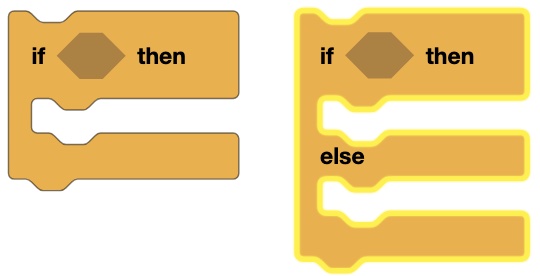
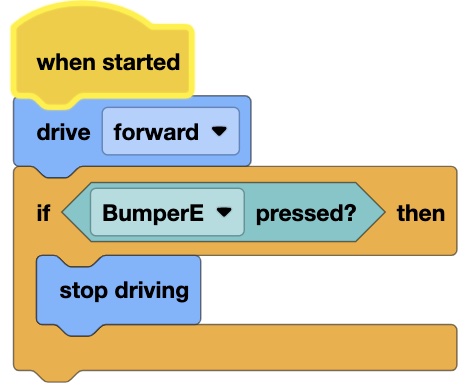
Step #2: Add an If/Then statement to the Motion program you just wrote. Have the robot stop after after the Bumper is pressed.
|
 |
Download the program to your robot and run it.
THE PROBLEM
|
 |
THE SOLUTION
|
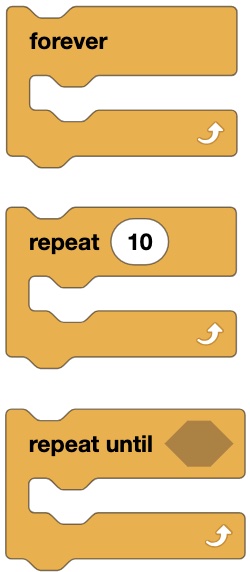
| The Problem: A computer reads a program in a 'Top Down' or Sequential order. In other words, it starts reading each line of code from the top in a downward progression. A computer is also reads very fast. Please view the Program above: What if the computer reads the "drive forward" line of code at 1 second and reads the "If/Then" line of code at 2 seconds. The problem is that the computer will only read the program once, so when "If Bumper E pressed", the computer will not know that it was suppose to "stop driving" because it had already read and passed that line of code 2 seconds earlier. | The Forever & Repeat block commands act as Loops so that the sensing action is endless. | The Solution is to place your If/Then statements in a Forever Loop or Repeat Loop. That way, the computer will keep reading everthing in the Forever Statement over and over. Now you are guaranteed that when the bumper is eventually pressed, the computer will notice it and "Then" "stop driving". |
Step #3: Add a Forever & If/Then statement to the Motion program you just wrote. The robot will now stop after the Bumper is pressed. Download it to your robot and test it.