Mini Maze
Hints That Will Help You Create Your Maze!
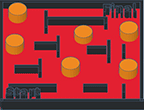
A. Design & Draw Your Mini Maze To Scale on Draft Paper Student Example #1 & Student Example #2
The Mini Maze measurements are on this Grade Sheet.
Draft Paper: Click here! (scale 1/8th inch)
Video Tutorial: (Mobile) (You Tube)
Measurements:
- Base: H: 1/4” x W: 3" x L: 3"
- Walls: H: 1/4” x W: 1/8" (Interior walls must be 1/4" away from all interior walls.)
- Holes: H: 3/8" x W: 3/8" (6 holes - must be 1/4" away from interior walls. Can touch exterior walls.)
Step #1:Creating the Base (Set up the Plane.) (Mobile) (You Tube)